THE EDITINGAPP NOTEBOOK
1980s AI photo prompts: find your kind of retro
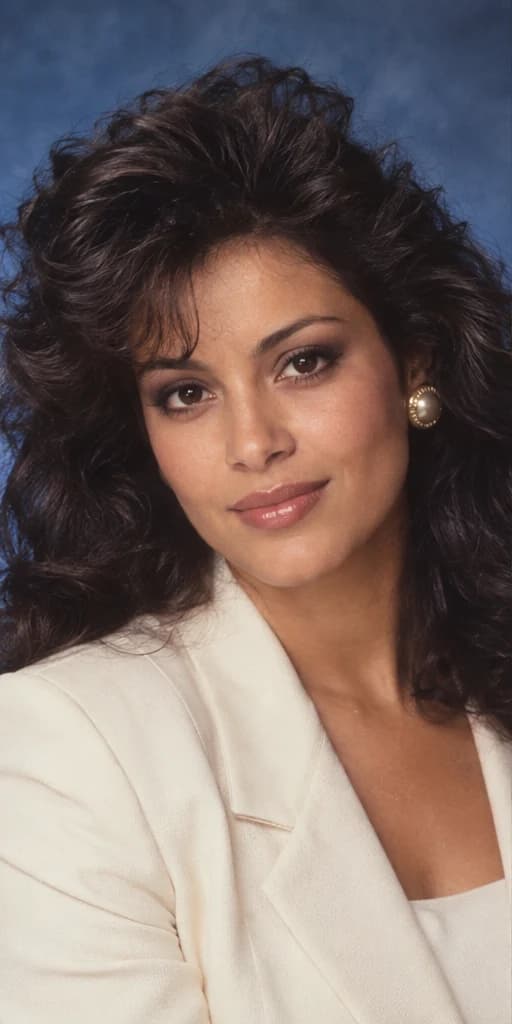
The best starting point for an 80s portrait is a specific photographic scene. Pick the light, clothes and background that belong together, then keep your face at the center of the edit.
What is the 1980s AI photo trend?
The idea is to restyle a present-day selfie as a portrait that could belong in an older studio collection, film publicity folder or family album. An AI edit can change clothing, hair and surroundings as well as color. A vintage filter usually changes the appearance of the existing photograph without rebuilding those details.
On September 10, 2026, The Indian Express reported on the 80s photo trend. On September 11, The Star described retro AI portraits on Instagram and TikTok. These reports show social-media activity; they do not establish a search-volume increase for EditingApp or predict how a particular portrait will perform.
You do not have to reproduce a trending post exactly. A restrained studio portrait can feel more convincing than adding every period detail at once. The examples on this site are clearly labeled AI demonstrations with a fictional subject. They illustrate an intended look, not a measured promise of what your upload will produce.
Choose the scene before writing the prompt
| Style | Visual ingredients | Choose it for |
|---|---|---|
| 80s Studio | Soft frontal flash, tailored clothing, blue studio backdrop | A composed, classic head-and-shoulders portrait |
| Retro Cinema | Burgundy clothing, amber light, teal shadows | A more dramatic publicity-photo mood |
| Vintage Family Album | Knitwear, warm window light, softly faded color | An informal single-person keepsake |
EditingApp offers these as presets, so no prompt entry is needed in the studio. The prompts below are original writing examples that explain the direction behind each look. If you use another editor that accepts reference-image prompts, adapt them to its supported controls. Different models can interpret the same wording differently.
Vintage Family Album describes the photographic style. The current app edits one person; it does not combine relatives or create a new group photograph. Similarly, Retro Cinema makes a still portrait, not a film clip or a poster with credits.
Prompt 1: a classic 80s studio portrait
Start here if you want an uncluttered background and a face that is easy to inspect. Let the jacket, hair volume and light provide the period cues. An even, softly lit input is a practical match for this scene.
Edit the reference photo into a realistic 1980s studio portrait of the same person. Preserve their age, skin tone, facial proportions and expression. Use a cream tailored jacket, tasteful period hair volume and a mottled blue backdrop. Light the face with soft frontal studio flash. Keep natural skin texture, believable fabric and restrained film grain. Frame the head and shoulders vertically. Do not add text, logos or other people.
The important boundary is between facial identity and styling. Hair can carry the 1980s look without hiding the eyes or replacing the hairline. A soft backdrop also makes changes to the outline of the face easier to spot. If a result seems overly polished, examine the cheeks and under-eye detail rather than judging only the clothes.
Prompt 2: a cinematic retro portrait
A cinematic look depends on where light falls. Specify one warm light direction and restrained shadow color. Asking for neon, lens flares, smoke, a busy street and strong blur together can distract from the face.
Create a photorealistic 1980s publicity portrait from this reference image. Keep the same recognizable person, expression, age and complexion. Use burgundy period clothing, a softly blurred background, warm amber side light and subtle teal shadows. Keep both eyes readable and facial features in focus. Add fine analog grain without heavy skin smoothing. Make a vertical portrait without a movie title, credits or a second person.
Check the shadowed side of the face carefully. Dramatic light can change the apparent shape of a nose or cheek even when the result looks attractive. The relevant question is whether you still recognize the person. If identity is difficult to judge, try the more evenly lit studio preset on a later attempt rather than accepting an ambiguous face.
Prompt 3: a vintage family album keepsake
For a quieter result, choose an everyday setting and familiar materials. Knitwear, a simple home interior and window light can suggest an album photograph without adding artificial scratches or a false date stamp.
Restyle this single-person reference photo as a realistic portrait from a 1980s family album. Preserve the subject’s recognizable facial features, age, expression and skin tone. Use cozy knitwear, warm window light and a modest home backdrop. Give the photograph gently faded analog colors and light grain, while keeping the face sharp. Include only the reference person. Do not add an album frame, handwriting, damage or a date stamp.
This is an imagined keepsake, not evidence of a past event. Avoid captions that suggest the picture documents a real year, relationship or occasion. If you want to restore an actual old photograph, choose a restoration workflow; EditingApp’s presets intentionally reinterpret its styling.
Make the portrait in EditingApp
- Choose a style. Open the AI retro portrait generator and select 80s Studio, Retro Cinema or Vintage Family Album. You can inspect the demonstration before uploading.
- Add your selfie. Use one clear face in a JPG, PNG or WebP under 4 MB. Export HEIC to JPG first. The image must be at least 256 × 256 pixels and at most 16 megapixels.
- Check the cost. A standard image uses 3 credits and high detail uses 8 under credit plans. The studio shows your current credits or allowance before submission. Choose a detail level you can afford; shared service limits also apply.
- Generate and review. Confirm you have permission to edit the photo. Verify your email when requested, submit once, and wait for the actual request status. Compare your original with the result before deciding to keep it.
- Download your choice. Save the portrait PNG or the labeled before-and-after composition. Sharing is your decision; the app does not publish a gallery or post to your social account.
Advanced detail settings are optional and do not guarantee a better likeness. If a connection is interrupted, use Check request to retrieve the existing attempt. An uncertain request stays reserved while its outcome is unresolved; a confirmed failure restores its allowance. Submitting the same photo as a new attempt is a separate generation.
Make a portrait you can review.
Choose your retro style, preview your selfie and check your allowance before you generate.
Create an AI retro portrait